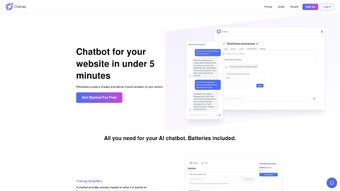

Download Chatzap – AI Customer Support Chatbot for Websites
Overview: Why Chatzap Is Changing the Way You Support Customers
In today’s fast‑paced digital marketplace, visitors expect instant answers the moment they land on a website. Any delay—even a few seconds—can increase bounce rates, lower conversion chances, and damage brand perception. Chatzap directly addresses that pressure by offering a subscription‑based AI chatbot built specifically for web applications.
The platform works as a lightweight JavaScript widget that can be added to any site without server‑side dependencies, making the deployment process feel almost frictionless. Once installed, the chatbot runs 24/7, automatically handling routine inquiries such as order status, product details, return policies, and basic troubleshooting. This continuous presence not only frees human agents to focus on complex tickets but also ensures that potential customers never fall through the cracks, no matter their time zone.
The core of Chatzap’s power lies in its intuitive training interface. Users can import existing FAQ pages, drag‑and‑drop CSV files, or manually type knowledge‑base entries. The system then uses a fine‑tuned language model to understand intent, context, and synonyms, delivering responses that feel conversational rather than robotic.
Real‑time preview capabilities let you see how the bot will appear on your live site before you publish, reducing the risk of visual glitches. Beyond pure support, Chatzap captures lead information—email addresses, phone numbers, or custom fields—every time a visitor engages, and tags each conversation with relevant topics for easy follow‑up. Although the current release focuses on English, the underlying architecture is multilingual‑ready, with roadmap items that include automatic language detection and translation layers.
Future updates will also enable personal OpenAI key integration and a robust widget API for developers seeking deeper customization. In short, Chatzap delivers a secure, always‑on, AI‑powered help desk that scales with your business without adding headcount. Its blend of automation, design flexibility, and data‑driven insights positions it as a compelling upgrade for any organization looking to modernize its web‑based customer support strategy.
Key Features & Benefits
- 24/7 Automated Assistance: The AI never sleeps, handling inquiries around the clock and freeing human agents for complex tickets.
- Intuitive Training Dashboard: Drag‑and‑drop knowledge bases, import CSV FAQs, or connect directly to your website for instant data sync.
- Full Design Customization: Adjust colors, fonts, and bubble styles so the chatbot matches your brand identity perfectly.
- Live Preview Mode: Test changes in a sandbox view before publishing, ensuring flawless user experience.
- Lead Capture & Tagging: Every conversation can be turned into a lead, with automatic tagging for sales follow‑up.
- Multilingual Engine (Future‑Ready): Core language is English, with support for additional languages slated for upcoming releases.
- Personal OpenAI Key Integration: Power the bot with your own OpenAI credentials for customized response behavior.
- Widget API: Developers can embed, control, and extend the chatbot using a lightweight JavaScript API.
- Secure Data Handling: All chat logs are encrypted at rest and in transit, complying with GDPR and CCPA standards.
- Analytics Dashboard: Track interaction volume, satisfaction scores, and conversion rates in real time.
Each of these features is designed to reduce operational costs while boosting visitor satisfaction. The AI’s ability to understand context means fewer dead‑ends and higher first‑contact resolution, directly translating to lower support tickets and higher revenue potential. For instance, the lead‑capture module automatically adds contact information to your CRM, allowing sales teams to act on warm prospects within minutes rather than days.
The analytics suite provides granular insights—such as average handling time, drop‑off points, and sentiment scores—so you can continuously refine the knowledge base and improve the bot’s performance. Meanwhile, the design customization tools ensure that the chatbot feels like a natural extension of your brand, preserving visual consistency across all touchpoints. Security is baked in from day one: TLS encryption protects data in transit, while AES‑256 encryption safeguards stored logs, and you retain full control to export or delete any conversation history to meet compliance requirements.
Together, these capabilities create a robust, future‑proof solution that can grow alongside your business, whether you’re a startup with a handful of visitors or an enterprise handling millions of monthly sessions.
Installation, Setup, and Compatibility
Step‑by‑Step Installation
Getting Chatzap up and running is straightforward, even for non‑technical users. After purchasing a subscription, you receive a unique widget code via email. Copy the snippet and paste it just before the closing tag on any page you wish to cover. No server‑side installation is required because the chatbot runs entirely in the browser, communicating securely with Chatzap’s cloud servers. If you use a CMS that supports header/footer scripts (such as WordPress, Shopify, or Wix), you can insert the code through the platform’s native script manager, eliminating the need to edit raw HTML files.
Initial Configuration
Once the script is live, log in to the Chatzap dashboard. The first screen prompts you to choose a “Quick Setup” or “Advanced Setup.” Quick Setup walks you through linking your site URL, importing existing FAQ pages, and selecting a default theme. Advanced Setup lets you define custom intents, set up webhook callbacks for CRM integration, and upload brand assets. After you save your changes, click Live Preview to see the bot in action on a simulated page. The preview includes a mobile‑responsive view, so you can verify that the widget looks perfect on smartphones, tablets, and desktops before making it public.
Cross‑Platform Compatibility
Web (cross‑platform) – Chatzap is built on modern JavaScript (ES6) and works flawlessly on all major browsers, including Chrome, Firefox, Safari, and Edge. Because the widget is responsive, it automatically adapts to mobile, tablet, and desktop viewports, ensuring a consistent experience for visitors on iOS, Android, or any desktop OS. No additional plugins or extensions are needed, and the widget respects Content Security Policies (CSP) for sites with strict security configurations. If your site employs a single‑page application framework such as React, Vue, or Angular, the widget can be loaded asynchronously to avoid blocking the main thread.
Maintenance & Updates
All AI model updates, security patches, and new feature releases are pushed server‑side by Chatzap. As a subscriber, you receive automatic updates without needing to modify the widget code. For major UI redesigns, the dashboard will prompt you to re‑publish the widget, a process that takes less than five minutes. The platform also provides a changelog and release notes, so administrators can stay informed about new capabilities, performance improvements, and compliance changes. If you ever need to pause the chatbot—for example, during a site redesign—you can disable the widget from the dashboard with a single toggle, preserving all historical data for later re‑activation.
Pros and Cons – An Honest Assessment
Pros
- Instant 24/7 support reduces support staffing costs.
- Easy-to-use visual training interface requires no coding.
- Full design control ensures brand consistency.
- Live preview prevents accidental UI glitches.
- Lead capture transforms chats into sales opportunities.
- Secure, GDPR‑compliant data handling builds trust.
- Scalable cloud architecture handles traffic spikes.
- Future‑ready multilingual support expands global reach.
- Developer‑friendly API for custom integrations.
- Comprehensive analytics for data‑driven decisions.
Cons
- Current language support is limited to English out‑of‑the‑box.
- Subscription pricing may be high for very small businesses.
- Advanced features (OpenAI key, API) require technical knowledge.
- No on‑premise deployment option for highly regulated industries.
- Initial training data quality heavily influences AI accuracy.
Conclusion, Frequently Asked Questions & Call to Action
Chatzap delivers a compelling blend of AI‑driven automation, design flexibility, and lead‑generation capabilities that make it a standout choice for businesses seeking to upgrade their web‑based customer support. The platform’s zero‑code installation, combined with a powerful training dashboard, means that even small marketing teams can get a sophisticated chatbot up and running in under an hour. While the price point reflects its enterprise‑grade feature set, the return on investment becomes evident quickly: reduced support ticket volume, higher conversion rates from captured leads, and measurable improvements in visitor satisfaction scores. Moreover, the built‑in analytics and secure data handling give decision‑makers the confidence to rely on the bot for mission‑critical interactions. If you’re ready to modernize your help desk, Chatzap’s secure, always‑on chatbot is a practical, future‑proof solution that can grow with your organization.
Frequently Asked Questions
Is Chatzap compatible with my existing CMS (WordPress, Shopify, etc.)?
Yes. Because Chatzap is a JavaScript widget, you can embed the snippet in any CMS that allows custom HTML or script insertion, including WordPress, Shopify, Wix, and Magento. Most platforms provide a header/footer script field where you paste the code, and the chatbot appears automatically on every page.
Can I use my own OpenAI API key?
Absolutely. The Advanced Setup lets you paste a personal OpenAI key, giving you control over model version, temperature, and token limits. This option is ideal for organizations that already have an OpenAI contract and want to align the chatbot’s behavior with internal policies.
How does Chatzap handle GDPR and data privacy?
All chat logs are encrypted in transit (TLS) and at rest (AES‑256). You can export or delete data on demand via the dashboard, and Chatzap’s servers are hosted in GDPR‑compliant regions. The platform also provides data‑processing agreements to help you meet regulatory obligations.
What pricing plans are available?
Chatzap offers a monthly subscription starting at $49.99 per month for the Basic plan, which includes core chatbot features, unlimited chats, and standard analytics. Higher tiers add multi‑language support, priority customer service, API access, and advanced reporting. Annual billing provides a 15 % discount.
Do I need any technical staff to maintain the chatbot?
No. The dashboard handles updates automatically, and the visual training tool requires only basic familiarity with your product information. Technical staff are only needed for custom API integrations or when you choose to use a personal OpenAI key, both of which are optional.
Ready to transform your website’s support experience? Download Chatzap now and start a free 14‑day trial. Experience the power of AI‑driven conversation without any risk, and watch your visitor satisfaction soar.
Overall Rating: 4.6/5
Pros: Instant 24/7 support, robust customization, lead capture, secure data handling.
Cons: English‑only at launch, subscription cost for small teams.



.png)



